
The WordPress theme landscape has fundamentally shifted. AI-Optimized WordPress Themes aren’t just about aesthetics—they’re engineered to communicate directly with search algorithms that understand context, user intent, and semantic relationships rather than just keywords.
Traditional themes rendered content for human readers first, with search engines as a secondary consideration. Today’s AI-driven search engines from major platforms analyze structured data, content relationships, and user engagement signals in real-time. Your theme’s architecture either amplifies these signals or buries them under technical debt.
What makes a theme “AI-optimized”? The answer lies in three fundamental shifts: semantic HTML structure that helps AI understand content hierarchy, schema markup integration that provides explicit context about your content type, and performance optimization that meets the Core Web Vitals standards AI search engines now prioritize. According to WordPress guidance, these elements work together to create what they call “AI-readable architecture.”
The stakes are clear. Themes that ignore this evolution risk invisibility in AI-powered search results, while properly optimized themes gain preferential treatment in answer boxes, featured snippets, and conversational search responses. The good news? You don’t need to rebuild from scratch—understanding the core principles puts you ahead of most websites still operating on pre-AI assumptions.
Ready to build your site the right way? Let’s start with what you’ll need.
Prerequisites: What You’ll Need to Get Started
Before diving into AI-Optimized WordPress Themes, you’ll need to assemble your technical foundation. Think of this as your pre-flight checklist—skip a step, and your AI-powered site might never get off the ground.
Essential Technical Requirements:
- Active WordPress installation (version 6.4 or later recommended for full AI compatibility)
- Hosting account with PHP 8.0+ and at least 512MB memory allocation
- SSL certificate installed (AI crawlers prioritize secure sites)
- Basic understanding of the WordPress dashboard and theme installation process
Recommended Tools:
Most AI website builders for WordPress work seamlessly with popular hosting platforms like Hostinger, GoDaddy, or Bluehost. However, you’ll want administrative access to install plugins, customize theme settings, and configure AI-powered features.
Budget Considerations:
Premium AI-optimized themes typically range from $59-$199 annually. Factor in potential costs for AI plugins (many offer free tiers), stock imagery, and staging environments for testing.
One practical approach is starting with a staging site to experiment with AI features before deploying to your live environment. This prevents disruptions while you master automated schema markup, predictive content suggestions, and intelligent layout adjustments. The learning curve is manageable—most users become comfortable within 2-3 hours of hands-on exploration.
Step 1: Choosing the Right AI-Optimized Theme
Selecting from the AI-Optimized WordPress Themes requires a different evaluation framework than traditional theme selection. AI-optimized themes aren’t just responsive templates—they’re structured to communicate with machine learning algorithms that power modern search.
Core Selection Criteria
Focus on three technical foundations: semantic HTML5 markup, schema.org integration depth, and clean code architecture. According to Best WordPress Themes for AI Search Engine Optimization in 2026, themes built with AI compatibility prioritize structured data over visual flourishes. This means automatic FAQ schema, breadcrumb markup, and product-specific rich results.
What typically happens with legacy themes is they layer these features through plugins, creating code bloat. AI-optimized themes bake structured data into core templates, reducing load times while improving machine readability.
Practical Evaluation Approach
Start with the theme’s documentation—look for explicit mentions of Core Web Vitals optimization and natural language processing compatibility. Top WordPress AI Themes in 2026 highlights themes that include AI-optimized content blocks, which format your text in ways conversational AI can parse effectively.
Test the demo site’s mobile performance first. AI search engines prioritize mobile-first indexing more aggressively than traditional algorithms. A theme performing below 90 on Google PageSpeed Insights won’t compete in AI-driven search results, regardless of other features.
How to Evaluate Theme Compatibility
Not every AI-optimized theme plays nicely with your existing setup. Before committing, you need a compatibility checklist that goes beyond surface-level promises. Effective WordPress Themes AI Search Optimization hinges on seamless integration with your current plugins, hosting environment, and content strategy.
Start by verifying PHP version requirements—most modern AI themes demand PHP 8.0 or higher to leverage machine learning libraries. Check your hosting dashboard first. According to WordPress documentation, outdated PHP versions create bottlenecks that nullify AI processing advantages.
Next, examine plugin conflicts. AI themes often bundle their own SEO and caching solutions. If you’re already running Yoast or Rank Math, dual SEO plugins will clash, creating duplicate meta tags that confuse search engines. Test in a staging environment—clone your site, activate the new theme, and monitor for JavaScript errors or layout breaks.
Database structure matters more than you’d think. Themes with advanced AI features may add custom tables for storing training data or search patterns. Confirm the theme provides clean uninstallation that removes these tables—orphaned data accumulates quickly and slows site performance over time.
Step 2: Installing and Activating Your AI Theme
With your compatibility checklist complete and your chosen theme downloaded, the installation process for AI-Optimized WordPress Themes follows a straightforward workflow—but the activation phase deserves special attention.
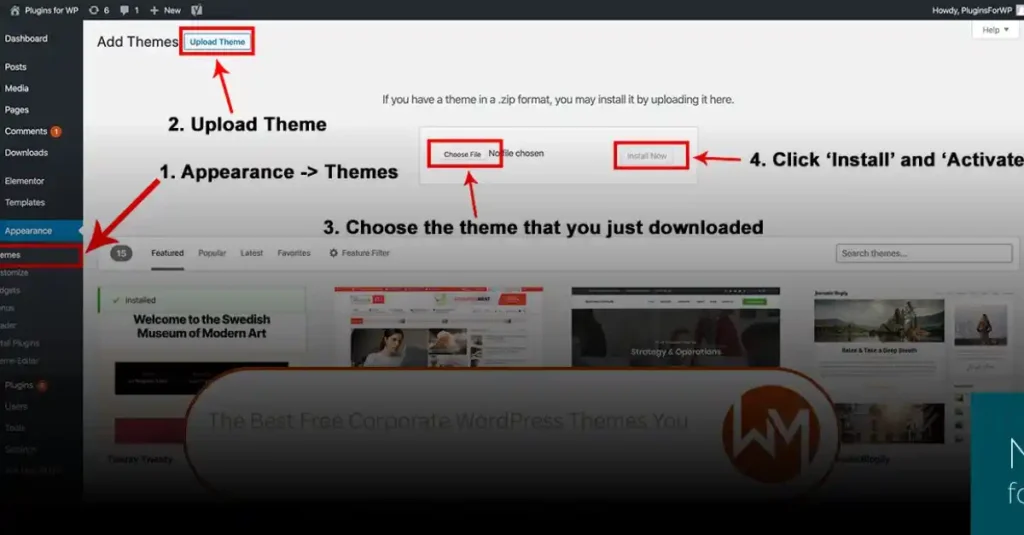
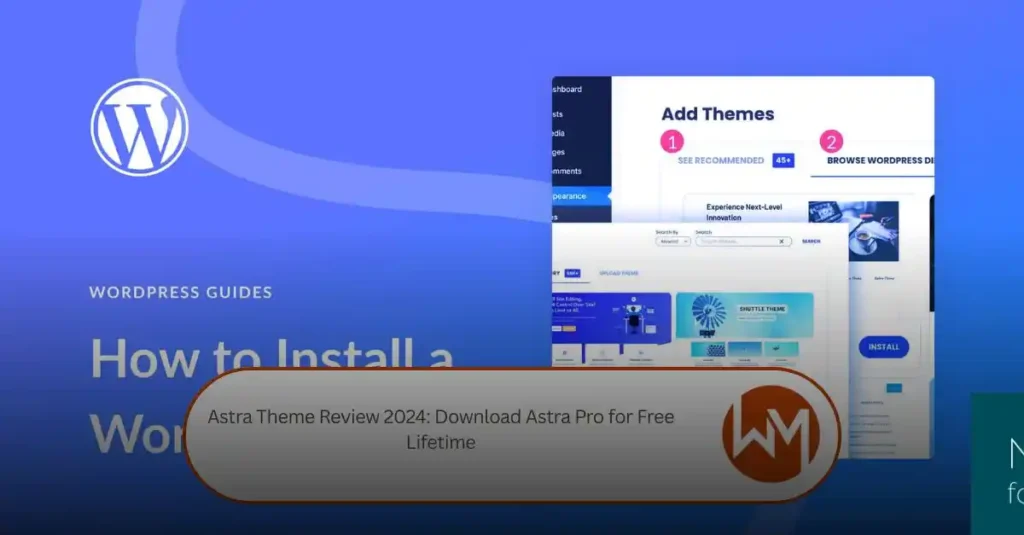
Navigate to Appearance > Themes in your WordPress dashboard and click “Add New Theme.” You’ll see two upload options: the ZIP file method (drag and drop your theme package) or the WordPress directory search. For premium AI-optimized themes, you’ll typically use the ZIP upload route. WordPress Tutorial for Beginners 2026 walks through both approaches if you encounter upload size limitations.
What typically happens after activation is where AI themes diverge from traditional setups. Most AI-optimized themes trigger a setup wizard that configures schema markup, semantic HTML structures, and initial AI crawler settings. Don’t skip this wizard—it establishes the foundation for everything that follows. Some themes will prompt you to connect to external AI services or install companion plugins for full functionality.
Critical checkpoint: Before importing demo content or making design changes, verify that your theme activated without plugin conflicts. Check for error messages in the WordPress admin header and test your homepage loading speed. A properly installed AI theme should maintain or improve your baseline performance metrics, not degrade them.
One practical approach is activating the theme on a staging environment first, particularly if you’re transitioning from a legacy theme with custom post types or complex taxonomy structures.
Step 3: Customizing Your AI-Optimized Theme
With your AI theme activated, customization transforms your site from template to unique digital asset. The WordPress Customizer remains your starting point—accessible through Appearance > Customize—but modern Semantic WordPress Themes extend this with AI-powered design assistants that understand context, not just color palettes.
Start with layout adjustments. Most AI-optimized themes include pre-built page templates specifically structured for schema markup and crawlability. According to How to use AI to optimize WordPress, selecting these templates ensures your content hierarchy matches what AI search systems prioritize. Focus on homepage layout first—hero sections with clear value propositions perform better with conversational search queries.
Next, configure your typography and spacing. AI themes typically offer semantic heading styles that automatically maintain proper H1-H6 hierarchy. Avoid the temptation to style headings purely for aesthetics; these elements signal content structure to AI crawlers. One practical approach is testing your heading hierarchy with browser reader mode to verify logical flow.
Color scheme decisions should serve readability first, brand identity second. High contrast ratios benefit both human readers and accessibility scanners that AI systems increasingly consider in rankings. Most AI themes include WCAG-compliant color pairings—use them as your starting baseline before adding custom brand colors.
Now you’re ready to explore AI-powered customization tools that accelerate your design workflow.
Utilizing AI Tools for Customization
Beyond your theme’s built-in customizer, dedicated AI tools can transform your WordPress design workflow while maintaining the foundation of Performance WordPress Themes AI. These assistive technologies don’t replace your creative decisions—they accelerate repetitive tasks and suggest optimizations you might otherwise miss.
AI-powered website builders within WordPress environments now offer intelligent layout recommendations based on your content type and industry. When you upload a product page, for instance, these tools analyze similar high-performing pages and suggest element placement that typically converts better. The suggestions remain optional, letting you maintain creative control while benefiting from pattern recognition across millions of sites.
Content enhancement represents another practical application. AI writing assistants integrated with WordPress can suggest heading variations, identify missing semantic keywords, and flag readability issues—all within your editing interface. These tools complement your theme’s typography settings by ensuring your chosen fonts and layouts work harmoniously with well-structured content.
However, maintain realistic expectations. “AI customization tools excel at suggesting patterns, but they can’t replace your understanding of your specific audience,” notes a common limitation across platforms. Use these tools as your first draft generator or quality checker, not your final decision maker. The combination of AI efficiency and human judgment creates the strongest customization outcomes.
Step 4: Optimizing for SEO with AI Themes
Your customized AI theme provides the foundation, but SEO optimization transforms it into a discovery engine for your content. Modern AI-optimized themes include built-in features that align with both traditional search engines and emerging AI search platforms like SearchGPT and Perplexity.
Start with your theme’s SEO settings panel—most AI themes integrate native optimization controls. GeneratePress AI SEO capabilities, for example, allow direct configuration of meta descriptions, title templates, and structured data without requiring additional plugins. Navigate to your theme settings and locate the SEO or metadata section, where you’ll configure default templates for titles and descriptions across post types.
Next, enable AI-enhanced content analysis tools. These scanners evaluate your pages against readability metrics, keyword density, and semantic relevance—factors increasingly important for AI search engine optimization. What typically happens is the AI flags issues like thin content or missing alt text, providing actionable recommendations that improve both human and machine comprehension.
Configure your XML sitemap generation through the theme controls. AI themes automatically update sitemaps as you publish, ensuring search engines index new content immediately. This automation eliminates manual sitemap management while maintaining the accuracy search crawlers require.
Finally, verify your theme’s mobile optimization—a critical ranking factor. AI themes handle responsive design automatically, but testing actual page speed through tools like Google PageSpeed Insights confirms performance meets search engine standards. With these elements configured, your site becomes structured specifically for how AI systems extract and prioritize information.
Incorporating Schema Markup with AI
Schema markup transforms how search engines understand your content, and AI-optimized themes increasingly handle this automatically. Modern themes like those with Blocksy AI Optimization integrate structured data generation, ensuring search engines parse your content correctly without manual coding.
The practical advantage appears in search results: rich snippets displaying star ratings, event details, or FAQ answers directly in search listings. AI tools analyze your content type—whether it’s a product review, how-to guide, or local business page—and suggest appropriate schema types. Plugins like RankMath or Yoast integrate seamlessly with AI themes, automatically generating JSON-LD markup based on your content structure.
However, not all schema implementations are equal. Verify your markup using Google’s Rich Results Test to catch validation errors before they impact visibility. Common issues include missing required fields or incorrectly nested properties—problems that AI detection can flag during content creation.
A typical implementation pattern involves enabling schema globally in your theme settings, then customizing specific markup for critical pages. For example, product pages benefit from detailed pricing and availability schemas, while blog posts need article markup with proper author attribution. This layered approach ensures comprehensive coverage without overwhelming your workflow with manual adjustments.
Limitations and Considerations
While AI-optimized themes offer powerful capabilities, understanding their boundaries helps set realistic expectations. A common pattern is that automated AI features work best within their designed parameters—deviation requires manual intervention that can complicate workflows rather than simplify them.
Technical Dependencies create the most frequent challenges. AI features like Kadence Structured Content and automated schema markup depend on consistent data structures. When content doesn’t follow expected patterns—mixed post types, custom taxonomies, or unconventional layouts—AI optimization often falls short. The system generates generic markup rather than context-specific structured data.
Performance trade-offs emerge as themes add AI functionality. Each intelligent feature requires processing power: content analysis, predictive loading, and dynamic optimization all consume server resources. Sites on shared hosting may experience slowdowns during peak traffic, particularly when multiple AI features run simultaneously.
Content quality limitations remain significant. AI can optimize structure and technical elements, but it cannot determine content value or user intent accuracy. A technically perfect page with poor content still underperforms—the theme’s AI handles the “how” of presentation, not the “what” of substance.
However, these considerations shouldn’t deter adoption. They simply require informed decision-making about which AI features genuinely benefit your specific use case versus which add unnecessary complexity.
Example Scenarios: Implementing AI Themes in Different Contexts
Understanding how AI-optimized themes perform across different use cases helps you set appropriate expectations and implementation strategies. A common pattern is that what works for one site type may require adjustments for another.
E-commerce Implementation: For online stores, AI themes typically excel at product content generation and personalized recommendations. The automated content creation handles product descriptions efficiently, while structured data markup for products improves visibility in shopping search results. However, inventory management and payment processing remain outside the theme’s scope—you’ll still need dedicated plugins for these functions.
Blog and Content Sites: Publishers benefit most from AI-powered content optimization and semantic analysis. The theme automatically suggests related content, generates meta descriptions, and optimizes heading structures for better comprehension by both readers and search engines. One practical approach is using the AI features for initial drafts, then adding expertise and unique insights manually.
Service Business Websites: Professional service sites gain value from AI-generated FAQ schemas and local business markup. The automation handles routine SEO elements while you focus on showcasing credentials and building trust. What typically happens is the theme optimizes technical aspects while custom content differentiates your expertise from competitors offering similar services.
Key Takeaways
AI-optimized WordPress themes represent a significant evolution in how websites adapt to modern search behavior and user expectations. The shift toward conversational AI search engines means your theme choice directly impacts discoverability—structured content, semantic HTML, and intelligent schema markup are no longer optional features but foundational requirements.
The implementation path varies by technical comfort level. Built-in AI tools from providers like Hostinger and GoDaddy offer accessible entry points for beginners, while intermediate users benefit from specialized themes paired with strategic plugins. What typically happens is that sites see measurable improvements in engagement metrics within 60–90 days when AI features are properly configured, particularly in search appearance and content recommendations.
However, success depends on ongoing optimization rather than one-time setup. Regular performance audits, content refinement based on AI analytics, and staying current with emerging standards ensure your site remains competitive as AI search technology evolves.
Your next step: Audit your current theme against the AI-readiness checklist from earlier sections. Identify your biggest gap—whether schema implementation, mobile performance, or content structure—and address that first before moving to comprehensive optimization. Small, focused improvements compound over time to create genuinely intelligent web experiences.